Sales
Valve RFQ review
Each valve RFQ is checked for missing technical data, with the questions for the customer drafted on day one.
Sales engineerOn request

AI workflow automation for the processes rules alone cannot handle: reading emails and documents, deciding what each request needs and preparing the next step in your ERP, with people approving what matters.
AI automation combines two things: ordinary workflow automation for the steps that follow fixed rules, and an AI step for the parts rules cannot handle, such as reading a free-text email, a scanned delivery note or a 200-page tender. ShichifukuTekx designs and builds these automations for operations, finance, procurement, quality and service teams in the UAE, across the GCC and for clients worldwide.
Traditional automation (RPA, scripts, integration platforms) is reliable when inputs are structured and predictable. It breaks when a supplier changes their invoice layout or a customer writes their request in a different way. AI automation reads the input the way a person would, turns it into structured data and hands it to the same reliable rules. The AI step is kept small and checked, and the rest of the workflow behaves exactly as before.
Our RFQ automation reads PDF and Excel tenders, extracts line items and specifications and moves each quote through comparison and approval. OpsBridge connects Odoo to field service, maintenance contracts, IoT alerts and WhatsApp workflows. ForecastIQ writes approved replenishment back to Dynamics 365 Business Central. These follow the same pattern: AI where the input is messy, fixed steps where it is not, and a person where the decision matters.
Every automation has a written map of which steps run on their own, which use AI and which wait for approval. We start with the AI preparing work for people to approve, and move a step to fully automatic only when the logs show it is consistently right. When an automation needs to decide its own next steps across several tools, it becomes an AI agent. If you are not sure which process to start with, AI strategy and consulting helps you choose.
A typical AI automation: AI reads, fixed rules check and post, a person approves.
A supplier emails a PDF in their own layout, or a scan comes in on WhatsApp.
OCR and the model pull supplier, PO number, lines, totals and tax into fields.
Matched to the purchase order and goods receipt in your ERP; differences flagged.
Finance sees the original, the extracted data and the match, then approves or corrects.
Fixed automation creates the approved invoice in Dynamics 365 or Odoo.
Every step recorded: what was read, decided, approved and written.
Specific jobs this service does, not general promises.
Three levels of automation. Most processes need the second; some steps graduate to the third once trust is earned.
| Aspect | Rule-based automation | AI automation | AI agent |
|---|---|---|---|
| Handles | Structured, predictable inputs | Unstructured inputs: emails, PDFs, scans, messages | Open-ended tasks needing several steps and tools |
| Who decides the steps | Fixed by the designer | Fixed by the designer; AI fills in the data | The agent chooses within its permissions |
| When input changes | Breaks or needs re-configuring | Adapts to new layouts and wording | Adapts, and can ask for missing information |
| Human role | Handles exceptions | Approves key steps and exceptions | Approves actions that commit money, stock or promises |
| Typical example | Copy a paid invoice status to the ERP | Read any supplier invoice and queue it for approval | Resolve a customer request across email, ERP and stock |
A written scope you can hold us to.
Every step ends with something you can see.
We look at volume, time spent, error cost and input formats to pick the process where automation pays back first.
We map today's steps, collect real samples of the inputs and record how long each step takes, so savings can be measured later.
We build the automation with every consequential step waiting for approval, and test it against the collected samples.
The automation runs alongside the existing process; its results are compared with what people did and the gaps are fixed.
Steps that are consistently right move to fully automatic, and the next process is added on the same foundation.
Projects built with this service.
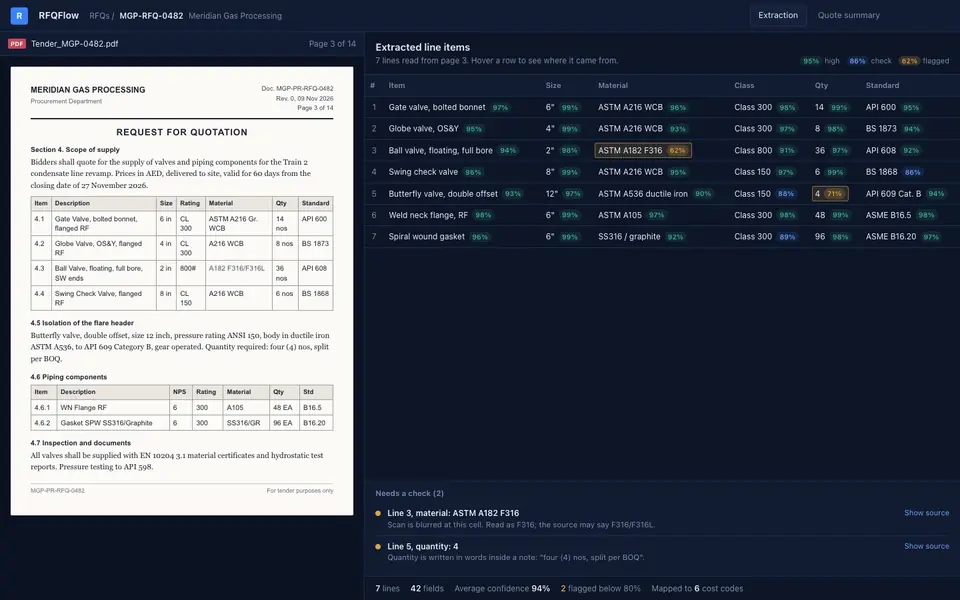
An RFQ platform that reads PDF and Excel tenders, extracts line items and specs, and moves each quote through comparison and approval in one place.
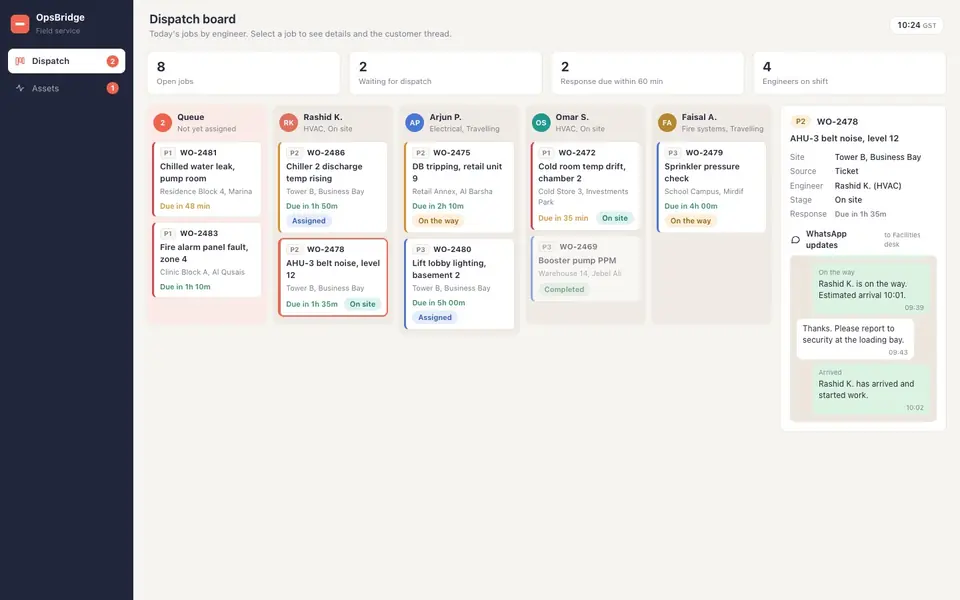
An Odoo-connected operations cockpit for AMC contracts, dispatch, offline service logs, IoT monitoring and WhatsApp workflows.
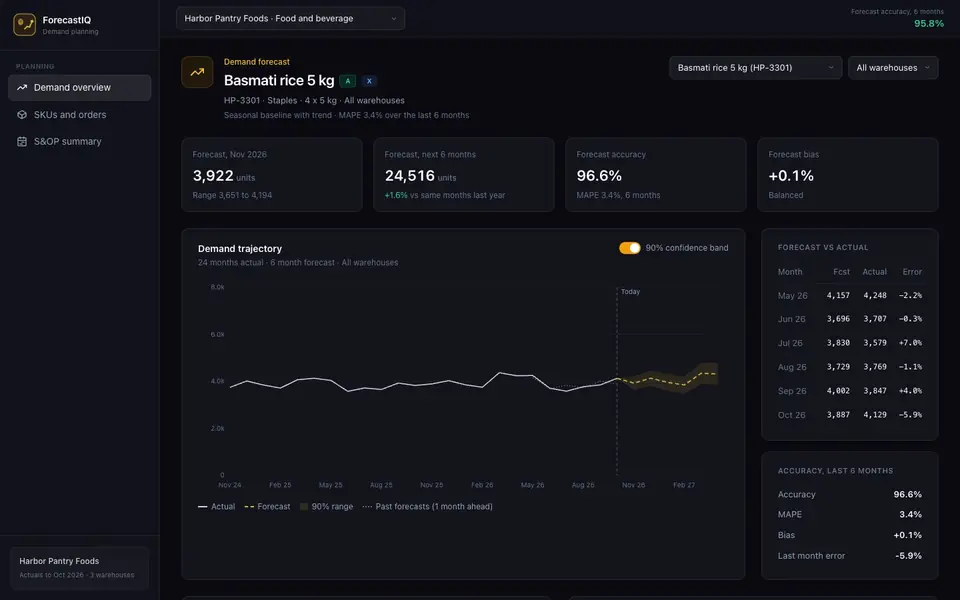
Demand forecasting, inventory planning and S&OP per SKU and per warehouse, with approved replenishment written back to Dynamics 365 Business Central.
Ready agents built with this service, running on Hivelock and connected to your systems.
Each valve RFQ is checked for missing technical data, with the questions for the customer drafted on day one.
On the 1st of each month, management gets last month's orders, purchases, deliveries and work orders by plant.
Every Friday, management gets open and overdue counts for purchasing, sales and production on one page.
A customs invoice is compared with the purchase order on articles, quantities, prices and currency.
Each morning, buyers get overdue purchase lines by supplier, with a chase email ready to use.
A supplier packing list is compared with the purchase order line by line, including quantities, before receiving.
AI automation services design and build workflows where AI handles the steps rules cannot, such as reading emails, documents and messages and deciding what each one needs, while ordinary automation handles the fixed steps such as creating records and sending notifications. The service covers choosing the process, building and integrating the automation, approvals, monitoring and support.
RPA repeats exact clicks and keystrokes on structured screens and inputs, so it breaks when a layout or wording changes. AI automation reads unstructured inputs such as free-text emails and varied PDFs and turns them into structured data first. The two work well together: AI for reading and deciding, fixed automation or RPA for the steps that never change.
Start with a process that has high volume, takes significant staff time, follows a recognisable pattern and has a clear correct outcome, such as invoice entry, RFQ reading or request triage. Avoid starting with rare, high-stakes decisions. An automation assessment ranks your candidates by value and effort.
In our projects it removes retyping, searching and copying between systems, and staff spend that time on checking, exceptions and customer work. People keep approval over steps that commit money, stock or customer promises. How you use the time saved is a business decision; the system is designed to keep people in control.
Yes. We have built integrations with Microsoft Dynamics 365, Odoo and the WhatsApp Cloud API, as well as email, databases and internal APIs. Automations start with read access and gain write access once testing shows they are reliable, with approval steps on anything consequential.
We mark each step as automatic, AI-assisted or approval-required, based on the cost of a mistake. Approval screens show the original input, what the AI extracted or decided, and the action it proposes, so a person can approve, correct or reject in one view. Corrections are logged and used to improve the automation.
It starts with a 2 to 3 week fixed-price assessment that includes a working prototype for the first process. A single process can usually be running side by side within a few weeks after that, depending on the number of systems and input types. We estimate time saved from your actual volumes so the cost can be compared with the return.
Automations run on your cloud, a region you choose or your own servers, with credentials scoped to what each step needs. Where documents must not leave your environment, the AI steps use self-hosted models. Every run is logged, and access to approval screens follows your existing roles.
Book a 30-minute call or send us a project brief.