AI Agents & Workflow Automation
AI agents and workflow automation that read your documents, use your tools and act inside ERP, email and WhatsApp, with a person approving any step that commits money or stock.
An AI agent is software that reads a request, decides which steps to take, calls tools such as your ERP, inbox or database, and reports back. ShichifukuTekx designs, builds and runs these agents for operations teams in the UAE, across the GCC and for clients worldwide.
What can an AI agent do for your business?
Most of our agent work falls into four patterns:
- Document agents that answer questions from SOPs, contracts, specifications and quality records using retrieval-augmented generation (RAG), with a citation to the source page.
- Channel agents on WhatsApp Cloud API and email that triage requests, collect missing details and draft replies.
- ERP agents that read from and write to Microsoft Dynamics 365 or Odoo: checking stock, preparing quotations, logging service tickets.
- Workflow agents built on LangGraph or n8n that chain several steps, such as reading an RFQ, matching lines to catalogue items and preparing a draft quote.
We treat agents as production software. Each one has a defined scope, a test set of real examples, guardrails on what it may and may not do, and a human-in-the-loop step for anything that commits money, stock or a customer promise. Logs record every tool call, so your team can see why the agent did what it did.
Where data cannot leave your network, we deploy self-hosted open models through Ollama on your own servers, in a cloud region you choose or on edge hardware. Where it can, we use OpenAI or Gemini models under your own account. Many teams start on Hivelock, our AI agents platform (currently in beta), and extend it with custom tools. Others need a bespoke build from day one. If you are still deciding where agents fit, start with AI strategy and consulting.
What changes for your team
What you get from us
A written scope you can hold us to.
- Use-case map with scope, risks and success criteria for each agent
- Agent design: tools, permissions, prompts and escalation rules
- RAG pipeline over your documents with source citations
- Integrations with ERP, email, WhatsApp Cloud API or internal APIs
- Human-in-the-loop approval screens and notifications
- Evaluation suite built from real examples, run on every change
- Guardrails, rate limits and audit logging
- Deployment on Hivelock, your private cloud or on-premise servers
- Runbook, monitoring dashboard and team training
- Workflow map showing which steps run automatically, which use AI and which need approval
From first call to production
Every step ends with something you can see.
- 01
Discovery sprint
Two to three weeks to choose the first workflow, collect sample data, map the systems involved and agree how success will be measured.
- 02
Connect your systems
We connect the agent to your ERP, MES, inbox, WhatsApp or document stores with scoped credentials, starting with read-only access.
- 03
Build and test
We build against a test set of real cases, tune retrieval and prompts, and add guardrails before anyone outside the project team uses the agent.
- 04
Deploy and train
The agent goes live on private cloud, a cloud region you choose or edge, with approval steps switched on, and we train your users.
- 05
Expand
Once the first agent is stable, we widen its permissions with care or add the next workflow, reusing the same tools and test set.
Ways to work with us
Work built with this service
Projects built with this service.
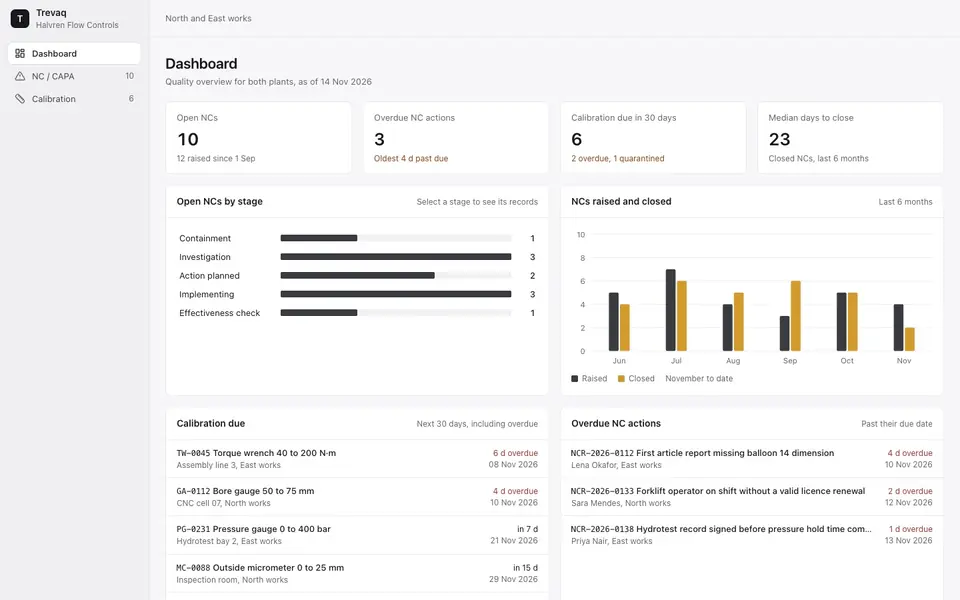
Trevaq gives one manufacturer a QMS for ISO 9001, IATF 16949, AS9100 and FDA/GMP
A Trevaq deployment covering ISO 9001, IATF 16949, AS9100 and FDA/GMP: documents, audits, CAPA, suppliers and SPC, with an AI assistant for audit prep.
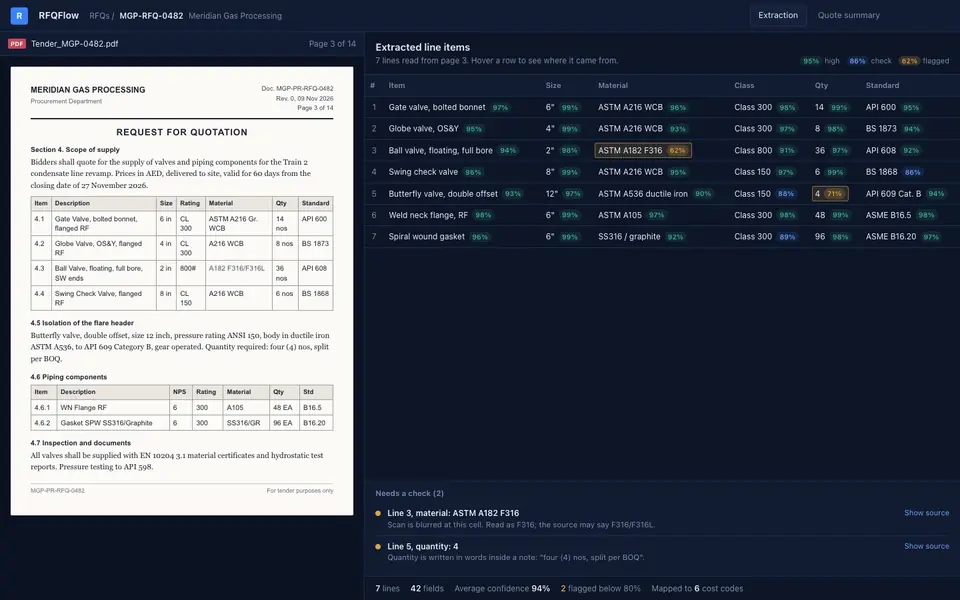
RFQs parsed from PDF and Excel into editable quotes
An RFQ platform that reads PDF and Excel tenders, extracts line items and specs, and moves each quote through comparison and approval in one place.
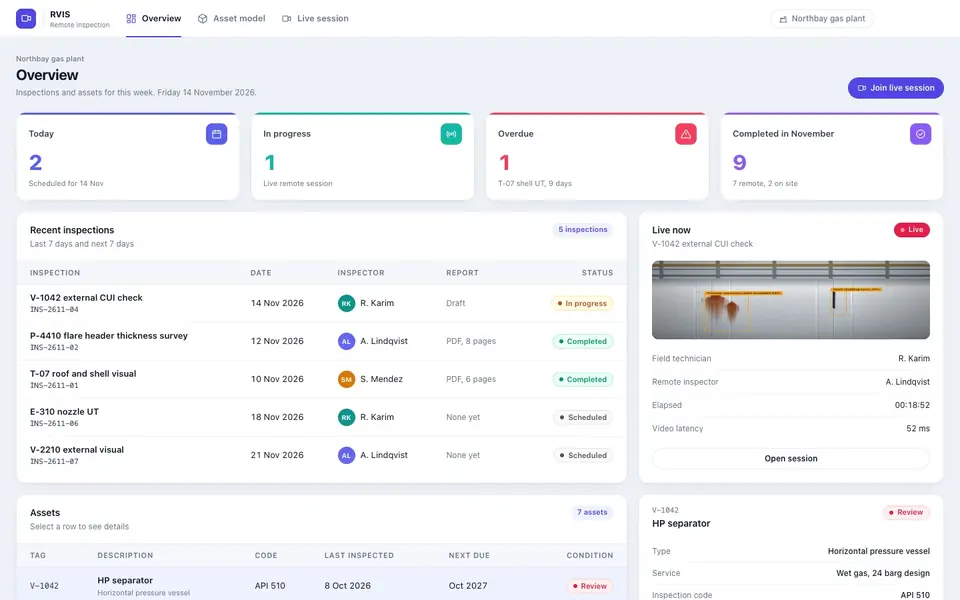
Remote inspections over sub-100 ms video with hazard detection
Live remote inspections with sub-100 ms WebRTC video, AR annotations, Gemini and YOLOv8 hazard detection, digital checklists and one-click PDF reports.
Questions about this service
What is AI workflow automation?
It is automation where an AI step handles the part rules cannot: reading an email or PDF, deciding what kind of request it is, and preparing the next action. Fixed steps such as creating a record or sending a notification run as normal automation, and anything that commits money or stock waits for a person to approve.
How much does it cost to build an AI agent?
Cost depends on how many systems the agent touches, how much data needs preparing and how strict the approval and audit requirements are. We start most projects with a fixed-price discovery sprint of 2 to 3 weeks, which produces a working prototype and a costed production plan. Running costs depend on the model: hosted APIs are billed per use, while self-hosted models need server capacity instead.
How long does it take to deploy an AI agent?
A focused agent, such as a document assistant or a WhatsApp triage agent, can usually reach a controlled pilot within a few weeks of the 2 to 3 week discovery sprint. Agents that write into ERP systems take longer, because we add approval steps, permission checks and testing against real records before they go live with your wider team.
What is the difference between an AI agent and a chatbot?
A chatbot answers questions in a conversation. An AI agent can also act: it decides which steps to take, calls tools such as your ERP, email or database, checks the result and continues until the task is done or needs a person. Because agents take actions, they need stronger controls, so we add permissions, guardrails and approval steps around them.
Can AI agents run on our own servers instead of a public cloud?
Yes. We deploy self-hosted open models through Ollama on your own servers, in a cloud region you choose or on edge hardware, so prompts and documents stay inside your environment. Self-hosted models need more compute and careful sizing, so during discovery we compare them with hosted options such as OpenAI or Gemini on your actual tasks before you commit.
Can an AI agent work with Dynamics 365, Odoo and WhatsApp?
Yes. We have built integrations with Microsoft Dynamics 365, Odoo and the WhatsApp Cloud API. Agents usually start with read access, such as checking stock or order status. They gain write access, such as creating quotations or tickets, only after testing, and actions that commit money or stock go to a person for approval first.
How do you stop an AI agent from making mistakes?
We scope each agent tightly, ground its answers in your documents with citations, and test it against a set of real examples before every release. Guardrails block actions outside its permissions, and anything that commits money, stock or a customer promise goes to a person for approval. Every tool call is logged, so errors can be traced and fixed quickly.