Mobile & Field Apps
iOS and Android apps for customers and field teams, with offline sync, on-device ML and inspection workflows that work far from Wi-Fi.
Field work happens in plants, warehouses, construction sites and customer premises, often with weak signal and gloved hands. Most office software was never designed for that. ShichifukuTekx builds mobile apps that are, for operations teams in the UAE, across the GCC and in other markets worldwide, as well as customer-facing apps for founders.
What is an offline-first field app?
An offline-first app stores data on the device and works fully without a connection. Inspectors and technicians complete checklists, take photos, scan codes and capture signatures, and the app syncs to the server when a network returns, resolving conflicts in a predictable way. Nothing is lost when the signal drops.
What we build:
- Inspection and audit apps with configurable checklists, photo evidence and digital sign-off.
- Field service apps for job lists, parts usage, time logging and customer signatures.
- On-device ML using models such as YOLOv8 to spot defects or read labels from the camera, without sending images to the cloud.
- Remote assistance with live video over WebRTC, so an expert can guide a technician on site.
- Customer apps for ordering, booking, tracking and support.
We build with Flutter or React Native, so one codebase serves iOS and Android. Apps connect to your ERP, quality or service platform through documented APIs, often alongside a web back office we build as part of our custom software work. Where vision models are involved, our data and analytics team trains and evaluates them on your own images.
What changes for your team
What you get from us
A written scope you can hold us to.
- User flows and field workflow mapping
- UX and UI design for iOS and Android
- Flutter or React Native app with offline storage and sync
- Configurable checklists, forms, photo capture and signatures
- On-device ML models for detection or recognition where needed
- Back-office web admin and REST APIs
- Integration with ERP, QMS or service management systems
- Push notifications, role-based access and device security
- App Store and Google Play release, or private distribution
From first call to production
Every step ends with something you can see.
- 01
Discovery sprint
Two to three weeks including site visits to watch real field work, map data flows and define the first release.
- 02
Design and prototype
We design for gloves, sunlight and one-handed use, and test prototypes with field staff.
- 03
Build and integrate
We build the app and back office, wire up offline sync and connect to your ERP or service systems.
- 04
Pilot and train
A pilot with a small field team, then full rollout with user training.
- 05
Extend
We add features, new checklists and ML models as usage grows and processes change.
Ways to work with us
Work built with this service
Projects built with this service.
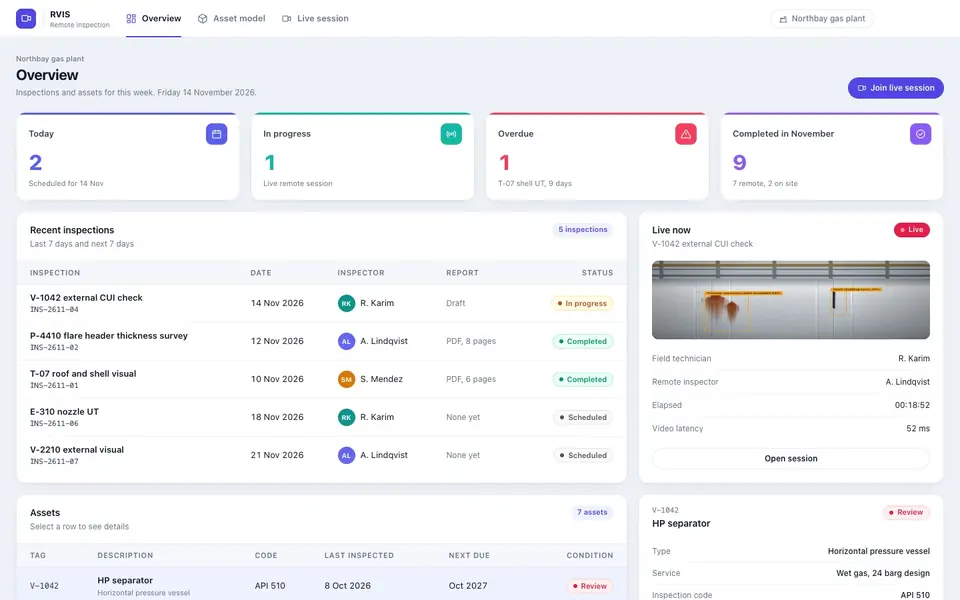
Remote inspections over sub-100 ms video with hazard detection
Live remote inspections with sub-100 ms WebRTC video, AR annotations, Gemini and YOLOv8 hazard detection, digital checklists and one-click PDF reports.
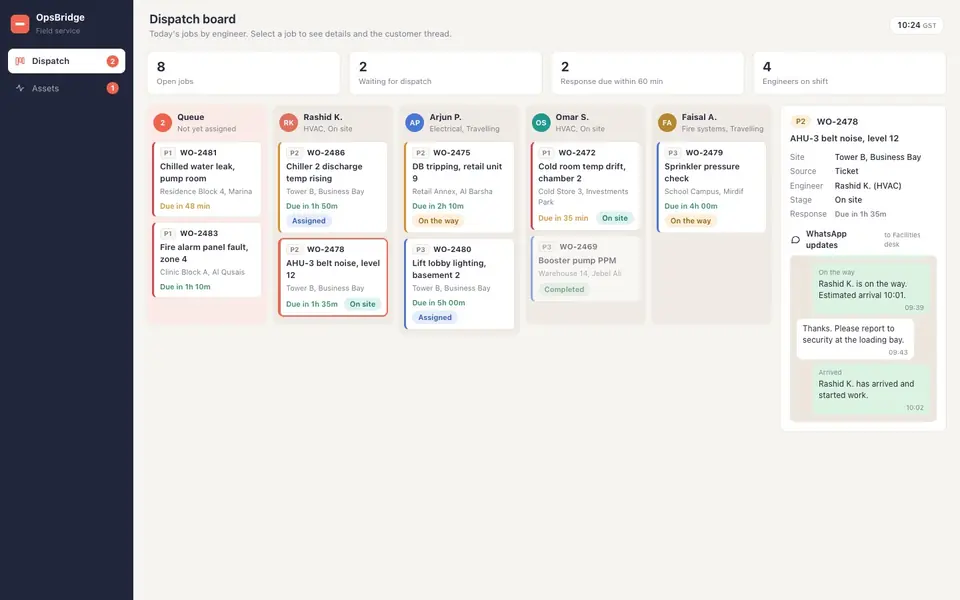
OpsBridge connects Odoo to field service, AMC contracts and IoT
An Odoo-connected operations cockpit for AMC contracts, dispatch, offline service logs, IoT monitoring and WhatsApp workflows.
Questions about this service
How much does it cost to build a mobile app in the UAE?
Cost depends on the number of screens, offline requirements, integrations and whether on-device ML is involved. A focused inspection app with offline sync is a very different budget from a customer app with payments and live tracking. A 2 to 3 week discovery sprint gives you a prototype and a fixed, phased quote before development starts.
How long does it take to develop a field app?
After the 2 to 3 week discovery sprint, a first field-ready version usually follows within a few months, depending on integrations and offline complexity. We run a pilot with a small team before full rollout, which surfaces practical issues early. Later features such as new checklists or ML models are added in regular releases.
What is the difference between Flutter and React Native?
Both build iOS and Android apps from one codebase. Flutter draws its own interface and gives very consistent results across devices. React Native uses native components and fits well when your team already works in React and TypeScript. We choose based on your existing skills, device features and long-term maintenance, and explain the trade-offs.
Can the app work without an internet connection?
Yes. Our field apps are offline-first: data is stored on the device, all core tasks work without signal, and changes sync to the server when a connection returns. We define clear rules for handling conflicts, such as two people editing the same record, so the data stays reliable.
Can the app detect defects using the phone camera?
Yes, for suitable tasks. We train and compress vision models, for example based on YOLOv8, to run on the device and flag visible defects, read labels or count items from the camera. Accuracy depends on good training images, so we collect and label samples from your own products during the project.
Can you connect the app to our ERP or quality system?
Yes. The app talks to a back-office API, which connects to systems such as Microsoft Dynamics 365, Odoo or our own Trevaq platform. Work orders, assets and checklists flow to the device, and completed records, photos and signatures flow back into the right place without manual re-entry.